Identify car part by photo: how it works and why use it
We’ve all been there. It’s Saturday afternoon, you’re deep into a weekend wrenching session, your hands are covered in grease, and you’re staring at a mystery sensor or a weirdly shaped bracket you just pulled from the engine bay. The part number is rusted off, the label is unreadable, and you’re left scratching your head wondering what to order.
In the old days, you’d spend hours digging through massive service manuals or posting blurry photos on car forums hoping some veteran mechanic would answer. Today? You can just use identify car part by photo tools. You simply take a picture with your smartphone, and the AI does the heavy lifting to give you a name, function, and replacement options. That’s the true power behind auto parts by photo technology and why having a dedicated car part identifier app on your phone is becoming just as important as having a good 10mm socket.
When “what is this car part” matters
Every DIY mechanic, project car builder, and even professional technician runs into situations where identifying a component visually is the only way forward. Here is when these tools become absolute lifesavers:
- The Junkyard Treasure Hunt: You’re walking through a local pick-and-pull marketplace and spot a pristine upgraded component or a rare trim piece. You need it, but without a part number, you can't verify if it fits your exact make and model.
- The “Leftover Parts” Syndrome: You just finished a grueling timing belt job, put everything back together, and—uh oh—there’s a random pulley or bracket sitting on your workbench. You need to confirm its exact name and location before starting the engine.
- Learning Your Project Car: If you just bought your first project car, staring under the hood can be intimidating. A visual scanner helps you learn the layout, putting a name to all those mystery valves, hoses, and modules.
- Faded or Foreign Labels: You need to find car part by image because the OEM sticker is completely melted by engine heat, missing entirely, or written in a language you don’t understand (a common issue with imported JDM or European parts).
In all these frustrating scenarios, a car part identifier app or a built-in “identify by photo” feature acts as your digital garage assistant. It gives you an immediate starting point: the specific part type, where it typically lives under the hood, and the exact terminology you need to type into a parts store search bar.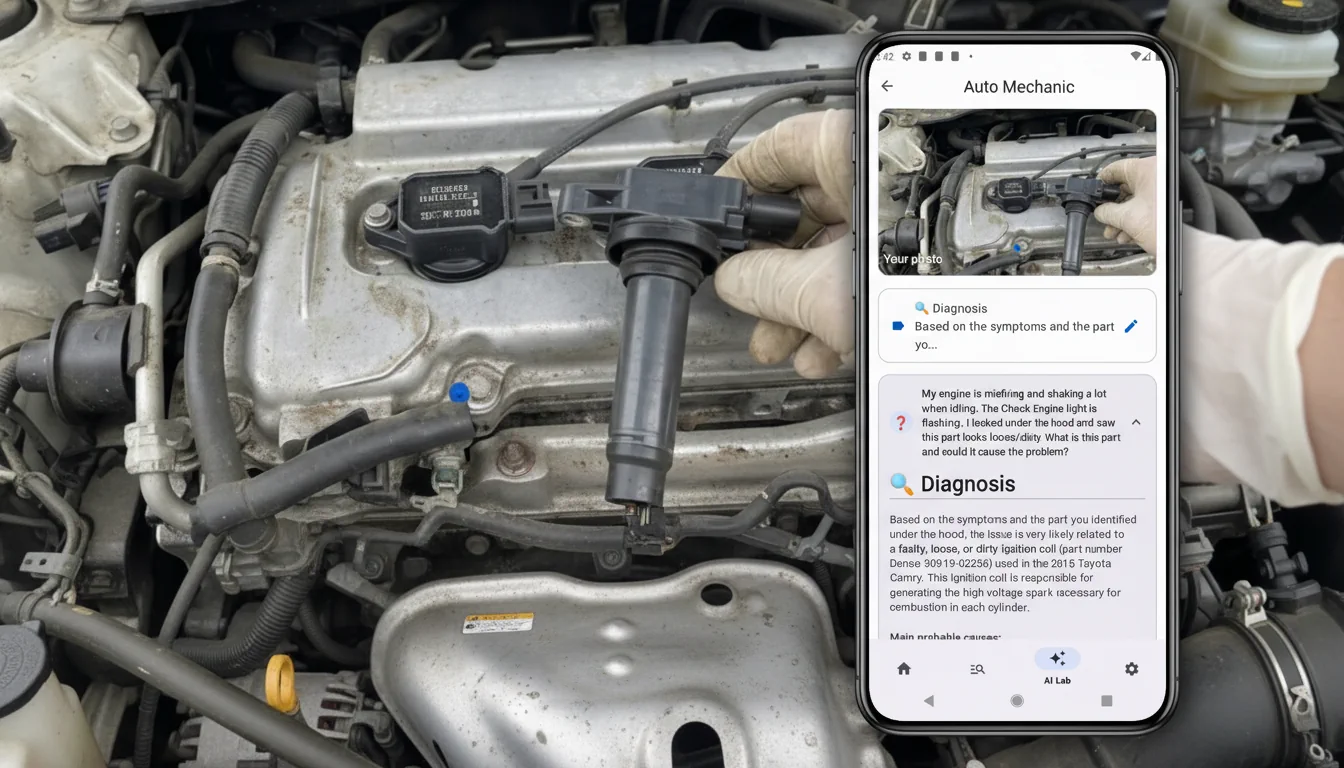
How identify car part by photo usually works
Think of it like Shazam, but for car parts. The technology behind it has gotten incredibly smart. Here is the step-by-step breakdown of how your phone figures out what you're holding:
- Snap the Shot: You take or upload a clear photo of the part. Pro tip: make sure you have decent garage lighting, wipe off excess grime if possible, and try to get the electrical connectors or distinct mounting points in the frame.
- AI Analysis: The app uses advanced image recognition machine learning. It scans the silhouette, pin layout, housing shape, and any visible manufacturer branding.
- Instant Results: You get a card with suggestions. It usually provides the universally accepted part name (e.g., "Mass Air Flow Sensor" or "EGR Valve"), sometimes the OEM part number, and a brief rundown of what it actually does.
- Take Action: Armed with the correct terminology, you can now confidently order the replacement, check for aftermarket upgrades, or dive deeper into diagnostic guides.
Keep in mind, the quality of your find car part by image search heavily depends on how clear the photo is. A blurry shot of a generic black plastic box might only yield a broad category like “relay box” or “sensor,” rather than a hyper-specific part number.
What you can do with the result
Identifying the part is only half the battle. Once you know what it is, a good app lets you take the next steps immediately:
- Order the right part the first time — Avoid the headache of buying the wrong component and dealing with return shipping. Use the suggested exact name to search confidently in auto parts catalogs.
- Find cheaper analogs — Dealership parts are expensive. Once you have the name, many apps will link you to direct aftermarket equivalents or cross-compatible parts from other car brands that fit perfectly but cost half the price.
- Learn how it works — Combine your search result with an offline automotive dictionary to understand why the part failed, what system it belongs to, and how to safely install it.
- Cross-check your diagnostics — This is huge. If you already pulled a code with your OBD2 scanner (like a P0171 Lean Code) or got advice from an AI mechanic, scanning the physical part helps you visually confirm you are replacing the correct culprit.
Try it in one app with AI mechanic and OBD2
Jumping between a forum, a camera app, Google search, and an OBD2 reader app is annoying when your hands are dirty. If you want to identify car part by photo and instantly connect it to an AI mechanic for symptom analysis and OBD2 code explanations, you need an all-in-one tool.
The free Auto parts. Automotive technologies app is built exactly for this workflow. It offers:
- Identify parts by photo — Snap a quick pic of that mystery engine component to get its real name and search hints in seconds.
- AI mechanic — Describe the weird knocking sound you hear or paste your OBD2 error codes for an instant, professional interpretation of the problem.
- Massive Offline guide — Deep dive into parts, systems, and repair theory even when you’re stuck in a dead-zone garage with zero cell service.
Stop guessing and throwing the parts cannon at your car. You can seamlessly go from “what on earth is this car part” to “oh, this is an idle air control valve, and that's why my car is stalling at red lights” without ever switching apps.
If you want to identify car parts by photo, decode OBD2 errors intelligently, and get guided troubleshooting steps, learn more about our Auto parts. Automotive technologies app. It puts a knowledgeable AI service advisor right in your pocket.

Available in other languages
- enIdentify Car Parts by Photo: AI-Powered Auto Parts Recognition
- ru Как определить автозапчасть по фото: умное распознавание деталей с помощью ИИ
- es Identificar piezas de coche por foto: Reconocimiento de autopartes con IA
- fr Identifier des pièces auto par photo : Reconnaissance de pièces assistée par IA
- de Autoteile per Foto identifizieren: KI-gestützte Erkennung von Ersatzteilen
- it Identificare i ricambi auto tramite foto: Riconoscimento dei componenti con l'IA
- pt Identificar peças de carro por foto: Reconhecimento de autopeças com IA
- pl Identyfikuj części samochodowe po zdjęciu: Rozpoznawanie części oparte na SI
- uk Визначення запчастин за фото: розпізнавання деталей за допомогою ШІ
- tr Fotoğrafla Araba Parçalarını Tanımlayın: Yapay Zeka Destekli Parça Tanıma
- sv Identifiera bildelar med foto: AI-driven igenkänning av bildelar
- no Identifiser bildeler med foto: AI-drevet gjenkjenning av bildeler
- hi फोटो द्वारा कार के पुर्जों की पहचान करें: AI-आधारित ऑटो पार्ट्स पहचान
- id Identifikasi Suku Cadang Mobil dengan Foto: Pengenalan Suku Cadang Berbasis AI